Direct case printing vs print-and-apply labels
Choose direct inkjet or an applied label from the case surface, print content, barcode requirement, changeover and logistics process.
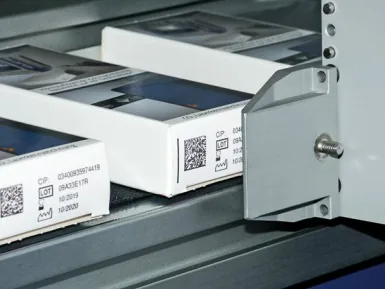
Direct inkjet marks the case; print-and-apply creates and applies a label
Large-character inkjet can print variable text, graphics and selected machine-readable codes directly onto suitable board. Print-and-apply produces a label carrying the required information and applies it to the case. The correct choice depends on the carton surface, data density, barcode quality, number of faces and how the case is handled through the warehouse.
| Factor | Direct case printing | Print-and-apply label |
|---|---|---|
| Surface | Best where the case face and ink produce consistent contrast and absorption. | Creates a controlled label background on varied case colours or surfaces. |
| Data density | Strong for large text, product ID, batch, handling marks and suitable barcodes. | Strong for dense logistics labels, multiple fields and standardised layouts. |
| Consumables | Ink; no label backing waste. | Labels and ribbon or direct-thermal media, plus backing waste where applicable. |
| Changeover | Electronic message plus head and case-guide adjustments. | Electronic label format plus label roll, ribbon, applicator and pack adjustments. |
| Application risk | Board porosity, colour, dust, print gap and wet ink contact. | Label adhesion, apply position, tamp or wipe motion and label-present confirmation. |
| Multiple faces | May require more printheads or controlled case rotation. | May require corner-wrap or multiple applicators depending on label position. |
Choose direct print when the board is suitable
- The required information fits within the available print height and width.
- The carton colour and finish provide repeatable contrast.
- The warehouse accepts the direct-print barcode or 2D-code quality.
- Reducing label stock or pre-printed case variants has operational value.
Run trials across the actual case suppliers, recycled-content variation, dust and normal compression or rub after printing.
Choose print-and-apply when the label owns the task
- A standard logistics label or dense data layout is required.
- The case background varies or cannot support reliable direct contrast.
- The label must be applied to a precise face, corner or pallet position.
- Trading partners require a defined label format or human-readable layout.
Confirm label material, adhesive, applicator method, product tracking, label-present detection and reject or stop behaviour.
Track the message to the correct outer case
Both routes need a reliable link between the product or order and the case. Define how the case identity is created, when the job changes and how mixed product or rework is controlled.
Product identification
Use an upstream product code, case pack count, order or scanner input to select the correct message.
Inspection
Check print or label presence, readable data and any barcode or 2D symbol, then match the result to the physical case.
Fault response
Define what happens on no print, no label, low consumable, applicator fault, unreadable code or reject not confirmed.
Related Lancing print-and-apply route
Where a logistics or corner label is required, review the Lancing print-and-apply labelling system alongside the large-character inkjet option. Final specification depends on the case, label, data and application position.
Test the full case range and warehouse handling
- Use every approved board colour, coating, print face and case supplier that affects the mark or label.
- Run the largest message and machine-readable code at minimum and maximum line speed.
- Check print drying or label adhesion before guide rails, accumulation, strapping and palletising.
- Verify code quality after compression, rub and storage representative of distribution.
- Challenge job changes, missing cases, double cases, data loss and reject confirmation.
- Compare ink, labels, ribbon, waste, operator time and maintenance per accepted case.
Send case samples, label or print artwork, line speed and logistics data requirements.
Compare case identification routes